Published September 22, 2026
When Your Security Cameras Stop Working: Repair, Replace, or Rebuild Your System?
Your security cameras don’t have to be completely dead for your security system to be failing you. Sometimes the warning signs are blurry video, cameras that randomly stop working, outdated recording equipment, tangled wiring, or a system that simply can’t provide the detail you need anymore.
The Problem Isn’t Always the Camera
When a security camera stops working, the first instinct is usually simple: replace the camera.
But that’s not always the right answer.
A security camera system is made up of multiple components working together. The cameras, recorder, storage, wiring, network connections, power and camera placement all play a role in how well the system actually protects a property.
That’s why replacing one failed camera on an aging system may only be treating the symptom instead of addressing the bigger problem.
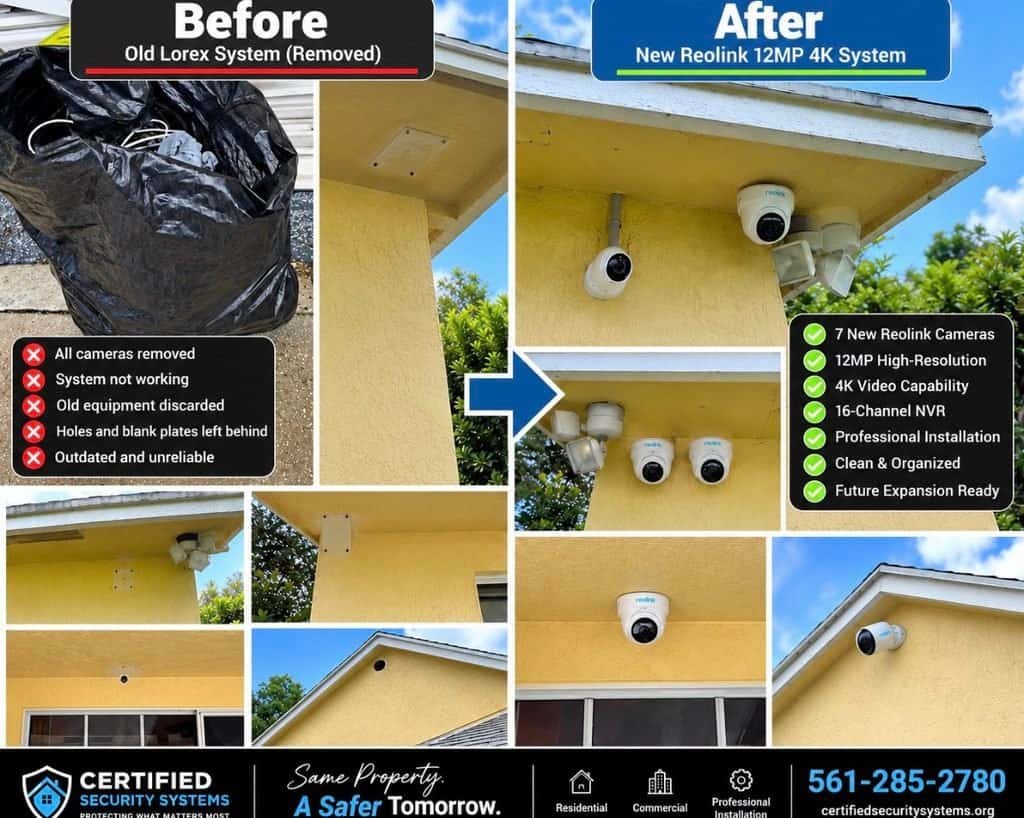
We recently saw exactly that during a South Florida security camera system upgrade. The homeowner’s existing Lorex system had stopped working, the wiring was messy, and the video quality was no longer where it needed to be.
The question wasn’t simply:
“What cameras should we buy?”
The better question was:
“What should replace this entire system?”
When Should You Repair a Security Camera System?
Not every failed security camera system needs to be completely replaced. Sometimes a single camera, cable, power supply or other component is the actual problem.
Before recommending a replacement, it makes sense to evaluate the condition of the existing system.
Some of the questions we look at include:
- How old are the cameras?
- Is the NVR still functioning properly?
- Is the recording resolution adequate?
- Is there enough storage?
- Are the existing cables in good condition?
- Are the cameras positioned correctly?
- Does the system provide the coverage the homeowner actually needs?
- Can the existing system support future upgrades?
- Is the equipment still supported?
- Is the system reliable enough to trust when something actually happens?
If the infrastructure is solid and only one component has failed, a repair may make perfect sense.
But when multiple pieces of an older system are showing their age, putting new equipment onto old infrastructure may not be the smartest long-term investment.
Why Replacing the Cameras Alone Can Be a Mistake
Here’s the part many homeowners don’t realize: a security camera system is a system.
You can install a beautiful new camera and still have a weak security system if the recorder is outdated, the wiring is damaged, the storage is inadequate, or the camera is pointed at the wrong location.
That’s why a professional security camera system upgrade should look at the entire installation.
Think of it like replacing the tires on a car with worn-out brakes and an engine that’s barely hanging on. The new tires may be great, but they didn’t solve the bigger problem.
The same principle applies to surveillance systems.
What We Found on This Lorex System
In this particular project, the homeowner had a seven-camera Lorex system. The cameras had stopped working, the existing wiring was poorly organized, and the overall video quality wasn’t providing the level of detail the homeowner wanted.
Rather than simply swapping out a few cameras and hoping for the best, we approached the project as a complete security camera system upgrade.
The goal was straightforward:
- Improve image quality
- Replace unreliable equipment
- Improve the overall installation
- Provide reliable recording
- Create room for future expansion
- Give the homeowner a system they could actually feel confident in
A 7-Camera Security Camera System Upgrade: From Lorex to 12MP Reolink 4K
The finished system included:
- 7 new Reolink security cameras
- 12MP high-resolution video
- 4K video capability
- 16-channel NVR
- Professional installation
- Cleaned-up and organized system infrastructure
The result wasn’t just a newer set of cameras. It was a completely different level of surveillance for the property.
You can learn more about the camera technology directly from Reolink .
And the difference is something you can actually see.
Watch the Security Camera Transformation
We documented the transformation from the old, failed Lorex system to the new Reolink 12MP 4K installation.
From tangled wires and an unreliable system to a clean installation with crystal-clear video—that’s what a real security camera system upgrade should look like.
Why 12MP Security Cameras Can Make a Difference
One of the biggest improvements in this project was the jump in image resolution.
Higher-resolution cameras can provide significantly more visual detail, which can be especially valuable when you’re trying to see what’s happening around driveways, entrances, walkways and other important areas of a property.
That additional detail can help when looking at things such as:
- Faces
- Vehicles
- Packages
- People approaching the property
- Activity around doors and gates
- Other details that may matter after an incident
However, there’s an important distinction: more megapixels alone do not automatically create a better security camera system.
Camera placement, lens selection, lighting, viewing distance, image processing, compression and the overall installation all affect what you can actually see.
That’s why choosing cameras based solely on the biggest number on the box isn’t necessarily the best way to design surveillance.
Why Use a 16-Channel NVR for Seven Cameras?
This is a question we hear often.
If the homeowner needed seven cameras, why install a 16-channel NVR?
Because seven cameras is what the property needed today. It doesn’t necessarily mean seven cameras will be enough forever.
A 16-channel recorder gives the homeowner room to expand the system later.
Maybe they decide they want another camera covering the driveway. Maybe they want better coverage around a side gate. Maybe they add coverage near a pool, detached structure or another entrance.
Planning for expansion can prevent homeowners from having to replace the recorder again simply because they ran out of available channels.
Good security design isn’t just about solving today’s problem. It’s about avoiding tomorrow’s problem whenever possible.
Before You Replace Your Security Cameras, Ask These 10 Questions
If your security camera system is getting old, don’t automatically assume you need to replace every component—or that replacing only the cameras is enough.
- Is the problem actually the camera? A failed camera could be caused by cabling, power, the recorder or another component.
- How old is the NVR? An aging recorder can become the weak link in an otherwise good system.
- Is the current video resolution good enough? If you can’t clearly see the details you need, an upgrade may be justified.
- Is the existing wiring worth keeping? Damaged, poorly installed or improperly organized cabling can create problems down the road.
- Are the cameras positioned correctly? Even an expensive camera can’t compensate for poor placement.
- Do you have enough storage? Higher-resolution video can require more storage capacity.
- Do you have enough NVR channels? Leave room for future expansion when it makes sense.
- Do you need different types of cameras? Different areas of a property may have different surveillance requirements. Our homeowner’s guide on which type of security camera you should choose breaks down the options.
- Is the system hardwired? Wired PoE surveillance can provide important advantages for reliability and installation.
- Will the new system actually solve the problem? This may be the most important question of all.
Repair, Replace, or Rebuild? Here’s Our Approach.
At Certified Security Systems, we don’t believe every homeowner automatically needs the newest or most expensive security camera system.
We believe the system should be designed around the property, the homeowner’s needs, the areas that need protection and the level of detail required.
Sometimes that means repairing an existing system.
Sometimes it means replacing a few components.
And sometimes, like this project, the better answer is to rebuild the system from the ground up.
The goal isn’t to sell you more cameras. The goal is to make sure the cameras you have actually do their job.
A Security Camera Upgrade Should Be More Than a Camera Upgrade
When an old security system fails, it’s tempting to look for the quickest replacement.
But your security system isn’t just a collection of cameras hanging around your house. It’s an important piece of your property’s security infrastructure.
If the cameras are outdated, the recorder is failing, the wiring is a mess, and the picture doesn’t provide the detail you need, replacing one component may not solve the real problem.
A properly planned security camera system upgrade looks at the entire system and asks a bigger question: What does this property actually need?
Don’t just replace what’s broken. Rebuild the security around what your property needs.
That’s exactly what we did with this Lorex-to-Reolink upgrade.
Need a Security Camera System Upgrade in Palm Beach County?
Certified Security Systems provides professional security camera installation, replacement and upgrades throughout Palm Beach County and surrounding South Florida communities.
We work with homeowners and businesses in areas including Royal Palm Beach, Wellington, West Palm Beach, Lake Worth, Loxahatchee, Boca Raton, Jupiter and surrounding areas.
If your current cameras are blurry, unreliable, outdated, no longer working, or simply aren’t providing the coverage you need, we’d be happy to evaluate the system and help determine whether it makes more sense to repair, replace, or rebuild it.
Call Certified Security Systems at 561-285-2780.
Frequently Asked Questions About Security Camera Upgrades
Should I repair or replace my security camera system?
It depends on the age and condition of the cameras, NVR, wiring, storage, image quality and overall system design. If multiple components are outdated or failing, a complete security camera system upgrade may provide a better long-term solution.
Can I replace my old Lorex cameras with Reolink cameras?
A replacement should be evaluated as a complete system rather than assuming cameras can simply be swapped. Compatibility between cameras, NVRs, cabling, power, recording and network configuration should all be considered.
Is 12MP better than 4K for security cameras?
12MP cameras can capture a high level of detail and can be useful when identifying people, vehicles and other objects is important. However, resolution is only one part of camera performance. Lens selection, camera placement, lighting, compression and viewing distance also matter.
Why would I need a 16-channel NVR if I only have seven cameras?
A 16-channel NVR provides room for future expansion. A homeowner may start with seven cameras but later decide to add coverage for a driveway, side yard, pool area, gate or another location.
How much does a security camera upgrade cost in Palm Beach County?
The cost depends on the number of cameras, camera type, resolution, NVR capacity, cabling, storage requirements, installation difficulty and other site-specific factors. A professional evaluation is the best way to determine the appropriate system.
Is Your Security System Ready for an Upgrade?
Don’t wait until your cameras fail when you need them most. Let Certified Security Systems take a look at your existing system and determine whether it should be repaired, upgraded or completely rebuilt.
Certified Security Systems
Serving Palm Beach County and surrounding areas
Call: 561-285-2780