
Alarm and cameras in one app is possible today, and you have two good choices: ADT+ or Google Home. Either one lets you arm the system, watch live cameras and check your locks from a single screen. At 11 p.m. in Royal Palm Beach, with a thunderstorm knocking your Wi-Fi sideways, that beats opening four apps to find out whether the garage is closed.
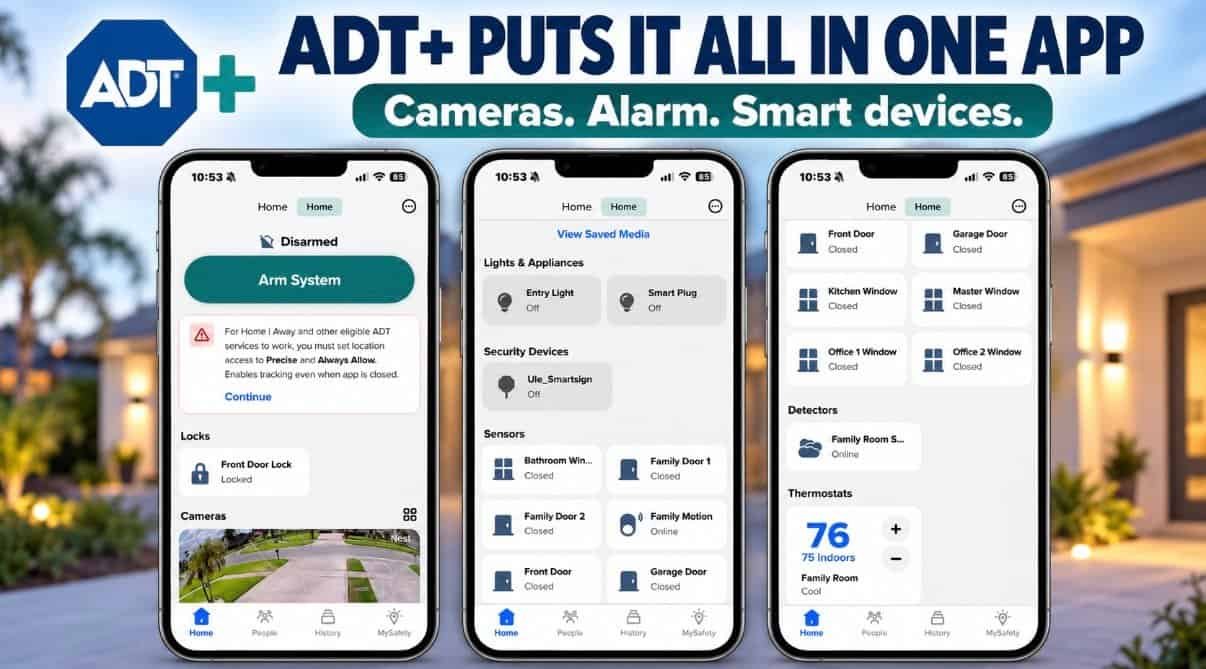
Good news: that app scavenger hunt is optional. Your alarm and your cameras can live on the same screen. Here’s how it works, how to pick the right app, and what to check before anyone drills a single hole.
Yes. A modern security system can run your alarm, cameras, sensors and doorbell from one app. At Certified Security Systems in Royal Palm Beach, we set customers up with either the ADT+ app or the Google Home app, so arming the system and checking the cameras happen on the same screen.
What “everything in one app” really means
When the pieces are set up to work together, one app can handle all of this from your couch, your office, or a beach chair in Jupiter:
- Arm and disarm the alarm from anywhere you have a signal.
- Watch live video and scroll back through recorded clips when something sets off an alert.
- Talk to visitors through a doorbell or camera that has two-way audio.
- Lock and unlock the front door, and see at a glance if it’s still unlocked.
- Check every door, window and motion sensor in one list. Front door, garage door, kitchen window, even the bathroom window.
- Keep an eye on your smoke detector and see that it’s online.
- Turn lights and smart plugs on and off from the same screen.
- Adjust the thermostat without getting off the couch. Very South Florida.
- Get one set of alerts and one History tab, instead of a notification circus from four apps.
- Set up automations, like having compatible smart devices react when the system arms.
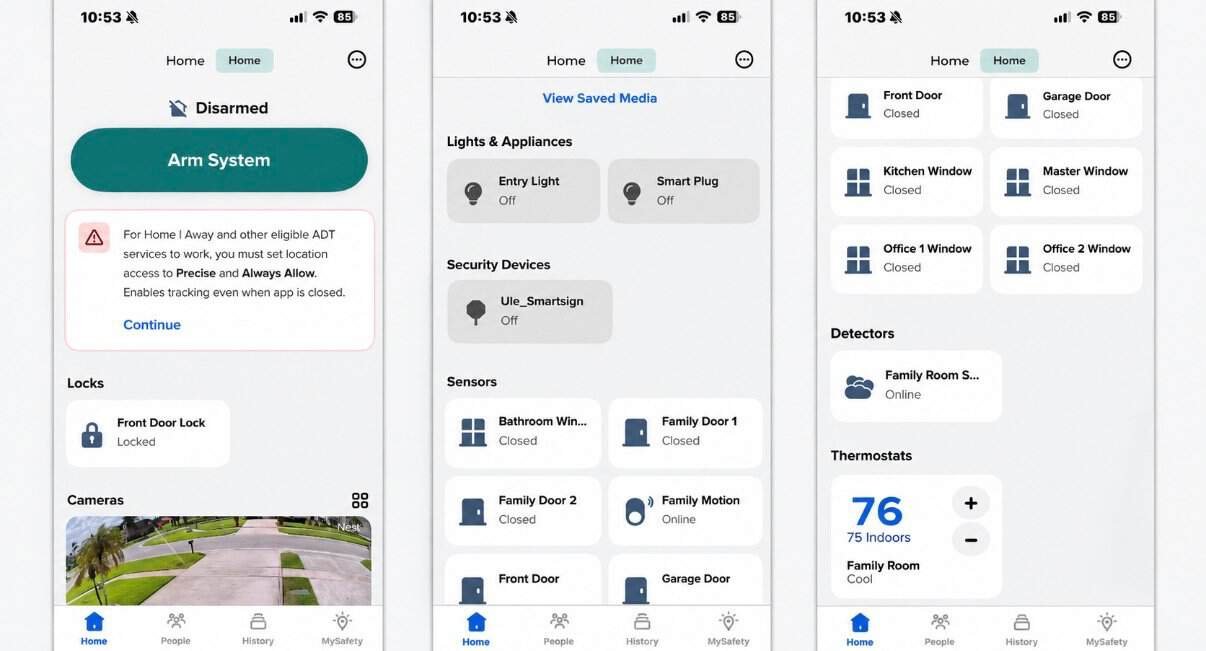
ADT describes what its own app does on the ADT+ app page, if you want to see the official feature list.
See the app in action
Seeing it move is easier than reading about it. Here’s a walkthrough of using the app:
ADT+ app or Google Home app: which one fits your house?
We don’t push one. We ask which app your family already opens without being told to.
Pick the ADT+ app if…
The alarm is your main event. You want arming, sensors, camera video and event history in an app built around your security system.
Pick the Google Home app if…
Your house already runs on Google. Your family lives in the Google Home app, and you want security sitting right next to everything else.
Either way, the goal is the same: one place to look, one place to tap.
How the pieces actually talk to each other
Think of it like a group chat. The alarm panel is the host. Door, window and motion sensors report to it. Cameras and doorbells connect through your home network. The app sits on top, so you see the whole conversation at once.
That last part is why the details matter. If a camera can’t get a strong signal, or if it isn’t a model your app supports, it drops out of the chat. That’s the one thing we plan for before installation day, not after.
Before you buy: the one-app checklist
- Check camera compatibility first. Not every camera shows up in every app. Older camera models are the usual culprit. Ask before you buy, or ask us and we’ll check.
- Test your Wi-Fi where the cameras will live. South Florida lots are big, and stucco and block walls eat signals. If the spot is far from your router, wired vs. wireless matters.
- Plan for power outages. Hurricane season is not the time to learn your system has no backup. Here’s how battery backup for alarms and cameras works.
- Count the cameras you really need. More isn’t always better. Our guide on how many cameras you actually need keeps you from overbuying.
- Know what you’re recording to. DVR vs. NVR affects how your video is stored and viewed.
- Already have an older system? You may not need to start over. See when to upgrade an old alarm and camera system.
CSS Man Tips & Tricks
Real tip: write down your Wi-Fi password and the email you used for your Google or ADT account before install day. It’s the number one thing that slows down setup.
Mythbusters: One-App Edition
Myth: “I need a separate app for every device.”
Busted. A properly planned system puts your alarm and cameras in one app.
Myth: “If I have cameras, I don’t need an alarm.”
Cameras show you what happened. An alarm can make noise and alert you while it’s happening. Together they’re stronger. We break it down in do I need an alarm system if I already have cameras?
Myth: “Smart security means it works with every smart gadget I own.”
Not automatically. Compatibility is checked device by device, which is exactly why we check first.
Palm Beach County alarm permit: we’ll handle that part
Here’s the paperwork nobody warns you about. Palm Beach County requires a permit for a burglar alarm system, issued by the Palm Beach County Sheriff’s Office. According to PBSO, it’s currently $25 to register and $25 each year to renew. You can read the rules and register at alarms.pbso.org. When you’re one of our customers, we help you get your permit so you don’t have to figure it out alone. Once you have your permit number, share it with your alarm company so it’s on file.
A quick break with CSS Man and Wendy
Security education works better when it’s funny. This one’s from our own crew:
Quick answers
From the field: Evan, our Lead Technician, shares his own take on this in his LinkedIn article, Alarm and Cameras in One App? A Technician’s Field Notes from South Florida.
Tired of the app scavenger hunt?
Bring us the confusion. We bring the ladder, and we beat any written quote.
Call 561-285-2780 or visit certifiedsecuritysystems.org