
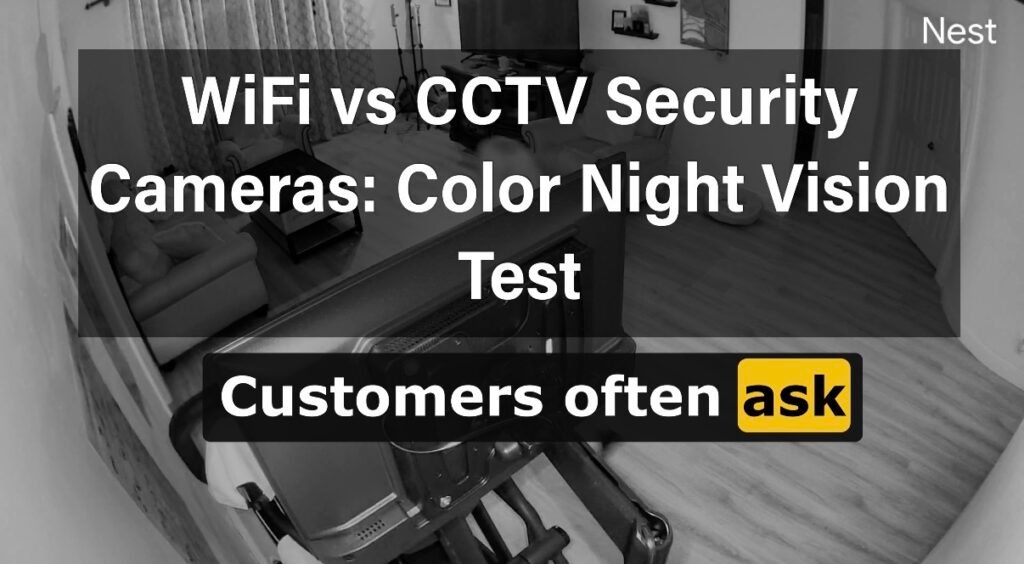
WiFi Camera Versus CCTV at Night: Can You Really See the Difference?
When you’re comparing security cameras, it’s easy to focus on resolution, apps, motion detection, and price. But there is one test that really matters: what can the camera actually see when it gets dark?
Our WiFi Camera vs. CCTV at night comparison puts two different types of security cameras to the test. One uses traditional infrared night vision, while the other is a hardwired CCTV camera capable of producing a color image at night.
The question isn’t simply whether a camera has night vision.
The real question is: how much useful information can you see when something actually happens?
Watch the WiFi vs. CCTV Night Vision Test
We recorded both cameras at night so you can see the difference for yourself. No stock footage. No computer-generated comparison. Just two cameras looking at the same environment in real-world nighttime conditions.
Look closely at the nighttime footage.
The WiFi camera can still see in the dark, but the image is primarily black and white. The CCTV camera continues to provide color information, giving you additional visual details about the scene.
That difference may not seem important when you’re simply checking whether your backyard is empty. But when you’re trying to identify a person, vehicle, piece of clothing, or other details after a security event, the information captured at night can make a real difference.
And yes, there is another important part of this test. Apparently, our household has developed a serious late-night snack problem. So naturally, we decided that security cameras should be involved in the investigation.
Security investigation update: We’re still trying to determine who keeps visiting the kitchen after midnight. Fortunately, we have video evidence.
Coming up: We’ll look at why color night vision matters, how hardwired CCTV differs from WiFi cameras, and why the connection between your cameras and recording system can be just as important as the camera itself.
Why Color Night Vision Matters
When comparing WiFi versus CCTV at night, one of the biggest differences you may notice is how each camera handles color in low-light conditions.
Traditional infrared night vision is designed to help a camera see when there isn’t enough visible light for a normal color image. The result is often a black-and-white picture that still gives you useful information about movement and activity.
But seeing that someone is there and being able to identify useful details about that person are two different things.
Traditional Infrared Night Vision
Provides visibility in dark conditions, but the image is generally displayed in shades of black, white, and gray.
- Excellent for detecting movement
- Useful for seeing people and objects
- Typically produces a monochrome image
- Color information is limited or unavailable
Color Night Vision
Uses available light and camera technology to preserve color information in low-light conditions.
- Provides additional visual detail
- Can help distinguish clothing colors
- Can help identify vehicle colors
- Produces a more natural-looking nighttime image
Why Does Color Matter in a Security Investigation?
Imagine that your camera detects someone walking across your driveway at 2:00 in the morning.
A black-and-white image may clearly show the person’s movement, clothing shape, and general appearance. That’s useful.
But now imagine that the camera also captures the fact that the person is wearing a red shirt and is standing next to a dark blue vehicle.
More information can mean more useful evidence.
The goal of a security camera isn’t simply to prove that something moved. The goal is to capture useful information about what happened.
Black and White vs. Color: What’s the Difference?
Think of it this way:
Black and white: “There is a person in the driveway.”
Color: “There is a person in the driveway wearing a red shirt beside a dark-colored vehicle.”
Neither type of night vision should be dismissed. Infrared remains a valuable technology and can provide excellent visibility in extremely dark conditions.
The important thing is understanding what you’re buying and what you actually need your cameras to accomplish.
The Real Question Isn’t “Does It Have Night Vision?”
Almost every modern security camera can advertise some form of night vision. The better question is:
“What will I actually be able to see when something happens at night?”
That’s where the difference between a basic camera and a professionally designed surveillance system becomes more important.
The camera itself is only one piece of the equation. The type of connection, recording method, camera placement, lighting, lens, and overall system design all affect how useful your footage will be.
Next: Color is only part of the story. We’ll look at another major difference between WiFi cameras and hardwired CCTV: how the camera gets its video back to the recording system.
WiFi vs. Hardwired CCTV: How Does the Video Get Back to Your Recorder?
The nighttime image is only one part of the equation. When comparing WiFi versus CCTV at night, there is another important difference that often gets overlooked: how the camera communicates with the recording system.
A WiFi camera sends its video wirelessly through your network. A professionally installed CCTV system can use hardwired network cabling to create a dedicated connection between the cameras and the recording equipment.
That distinction becomes especially important when you’re building a system designed to provide continuous surveillance rather than simply checking in on a camera from your phone.
WiFi Camera
The camera communicates with your network wirelessly.
- Quick and convenient installation
- Useful where running cable isn’t practical
- Easy to add to an existing network
- Depends on a stable wireless connection
Hardwired CCTV
The camera uses physical network cabling to connect to the surveillance system.
- Dedicated wired connection
- Designed for multi-camera systems
- Supports local recording to an NVR
- Doesn’t depend on WiFi for the camera connection
Why Does a Hardwired Connection Matter?
WiFi is incredibly useful. We use it for phones, computers, TVs, smart home devices, and countless other things every day.
But a security camera can be doing something very different from your average household device. It may be sending a continuous stream of high-resolution video back to a recording system for hours at a time.
With a hardwired CCTV system, the cameras have a physical connection back to the network and recording equipment. That creates a dedicated infrastructure specifically designed to move video from the cameras to the surveillance system.
Security cameras shouldn’t just look good. They need to deliver the footage.
A great camera is much more useful when the video reliably reaches the recording system and is available when you need to review it.
What Happens If Your Internet Goes Down?
This is an important distinction that is sometimes misunderstood.
A properly configured CCTV system can record video locally to an NVR, or Network Video Recorder. That means the cameras don’t necessarily need an active internet connection to continue recording to the local recorder.
If your internet service goes down, you may lose remote access through your phone until the connection is restored. But local recording can continue as long as the cameras, network, NVR, and power remain operational.
Internet access and video recording are not necessarily the same thing.
That’s one of the advantages of a properly designed local surveillance system. Your video can remain stored on-site rather than depending entirely on an internet connection or cloud service.
What About WiFi Cameras?
This isn’t an argument that WiFi cameras have no place in security. They absolutely do.
A WiFi camera can be an excellent choice for a homeowner who wants a simple way to monitor a front door, watch a package delivery area, check on a pet, or add visibility to a location where installing cable would be difficult.
The question is whether a WiFi camera is the right tool for the job.
Convenience is valuable.
But when you’re protecting your home or business, reliability and coverage matter too.
The Bigger Picture: Camera + Connection + Recording
A surveillance system is more than the camera mounted on the wall.
You have to consider the camera, connection, recording system, storage, lighting, placement, and network infrastructure as one complete system.
That’s why two cameras that look similar on a product page can perform very differently once they’re installed on an actual property.
A Good Security Camera System Should Consider:
- Nighttime lighting conditions
- Camera resolution and lens selection
- Color night vision capabilities
- Camera placement and viewing angles
- Wired versus wireless connectivity
- Local recording and storage
- Network reliability
- How long footage needs to be retained
And that brings us to another important question: what happens when you have multiple cameras watching an entire property?
Next: We’ll look at why professionally designed CCTV systems can be especially valuable when you need multiple cameras working together to protect an entire home or business.
Why a CCTV System Is More Than Just a Camera
One of the biggest advantages of professionally installed CCTV isn’t simply the camera itself. It’s the fact that the entire system can be designed around the property.
That’s an important distinction when comparing WiFi versus CCTV at night. A single WiFi camera may give you an excellent view of one area, but a professionally designed surveillance system looks at the property as a whole.
Where Are Your Property’s Vulnerable Areas?
A good camera system starts with a simple question:
“What areas actually need to be monitored?”
For a typical South Florida home, that might include:
Visitors, deliveries, and activity near the entrance.
Vehicles entering, leaving, and approaching the property.
Often-overlooked access points around the sides of the home.
Pool areas, patios, doors, and other activity zones.
Vehicles, equipment, storage, and access to the home.
Areas that may be hidden from another camera’s view.
More Cameras Don’t Automatically Mean Better Security
It’s tempting to think that the answer is simply adding more cameras.
But six poorly positioned cameras can provide less useful coverage than four cameras that were carefully selected and positioned for the property.
The goal isn’t “more cameras.”
The goal is the right cameras, in the right locations, capturing the right areas.
Camera Placement Becomes Even More Important at Night
A camera can have impressive specifications and still produce disappointing footage if it’s installed in the wrong location.
Lighting, reflections, distance, viewing angle, landscaping, walls, windows, and even the direction a camera faces can affect nighttime video.
For example, a bright light directly behind a person can make identification difficult. A camera pointed toward a reflective surface can create glare. A camera mounted too far away may detect movement without providing enough detail to identify what happened.
Nighttime security is a design problem, not just a camera problem.
The camera, lens, mounting location, lighting, viewing angle, network connection, and recording system all work together to determine the quality and usefulness of your footage.
Why This Matters for South Florida Homes
South Florida properties can present some unique challenges for outdoor surveillance.
Palm trees, dense landscaping, bright exterior lighting, reflective surfaces, large driveways, pools, detached garages, and expansive yards can all affect what a camera sees.
That makes proper camera placement particularly important. The best system isn’t necessarily the one with the most expensive camera. It’s the one designed around the property and the conditions where it will actually be used.
Think Like a Security Designer
Instead of asking:
“How many cameras do I need?”
Start by asking:
“What do I need to be able to see, and where do I need to see it?”
And Yes, the Snacks Are Still Under Investigation
We’ve now established that nighttime cameras can capture some surprisingly useful information.
Which brings us back to the most important security question of the evening:
Who keeps going into the kitchen at midnight?
The investigation continues. The cameras have no comment.
But jokes aside, this is exactly why having useful nighttime footage matters. When something happens, you don’t want a camera that simply recorded movement. You want footage that helps you understand what actually happened.
Next: We’ll put all of this together and look at the real value of a professionally installed CCTV system, including what you’re actually paying for beyond the camera itself.
Is CCTV Worth the Extra Cost?
After seeing the difference between the two cameras at night, it’s reasonable to ask: is a professionally installed CCTV system worth the additional investment?
The answer depends on what you expect your security cameras to do.
If you simply want to check whether a package arrived or see what’s happening at your front door, a WiFi camera may be perfectly adequate.
But if your goal is to build a surveillance system that provides comprehensive coverage, continuous recording, dependable connectivity, and useful nighttime footage, the value of a professionally designed CCTV system becomes much clearer.
You’re Paying for More Than the Camera
When you purchase a professionally installed CCTV system, you’re not simply buying a box with a camera inside.
You’re investing in an entire surveillance system that can include:
The Value Is in the System
Think of it like this: buying a camera is similar to buying a smoke detector.
The device itself is important, but where it is installed, how many you have, how they work together, and whether they’re properly maintained all affect how useful the overall system is.
A security camera is a component.
A properly designed surveillance system is the solution.
When WiFi Cameras Make Sense
To be fair, there are plenty of situations where a WiFi camera makes sense.
- You need a quick monitoring solution.
- Running cable isn’t practical.
- You only need coverage in one or two locations.
- You want to monitor a specific area from your phone.
- You are looking for a lower-cost way to add basic visibility.
In those situations, WiFi can be a smart and convenient option.
When Hardwired CCTV Makes More Sense
A hardwired CCTV system becomes particularly valuable when you need a more comprehensive surveillance solution.
- You want multiple cameras covering the property.
- You want centralized local recording.
- You want dedicated wired connections between cameras and the network.
- You need better nighttime image quality.
- You want cameras positioned specifically around your property’s vulnerabilities.
- You want a system designed for long-term surveillance.
- You need more advanced surveillance features as your needs grow.
The right choice isn’t always the most expensive option.
It’s the option that provides the level of coverage, reliability, image quality, and recording capability that matches your actual security needs.
What About the Cost of Missing the Details?
This is something worth considering when comparing cameras based solely on price.
Saving money on a camera doesn’t necessarily save money if the footage you eventually need isn’t detailed enough to answer the questions that matter.
If someone enters your property at night, you may not simply want to know that motion occurred. You may want to know where they came from, what they were wearing, what vehicle they arrived in, which direction they went, and what happened next.
The cheapest camera isn’t necessarily the least expensive security solution.
Sometimes the real value comes from having footage that is actually useful when you need it.
So…Is CCTV Better Than WiFi?
That’s not quite the right question.
The better question is: which technology is appropriate for the security job you’re trying to accomplish?
WiFi cameras provide convenience and flexibility. Hardwired CCTV systems provide a foundation for more comprehensive surveillance, especially when multiple cameras, local recording, dedicated connections, and advanced nighttime imaging are important.
Don’t buy a camera just because it can see at night.
Choose a system that can capture the information you need when it matters most.
And that brings us back to our little nighttime experiment.
The WiFi camera did its job. It showed us what was happening in the dark.
But the CCTV camera gave us more visual information, used a dedicated wired connection, and recorded to a centralized surveillance system.
And yes, we may finally have enough evidence to identify the person responsible for the late-night snack disappearances.
Next: We’ll wrap everything up with a simple checklist of what to look for when choosing a security camera system for your home or business.
What Should You Look for in a Security Camera System?
After comparing WiFi versus CCTV at night, it’s clear that choosing a security camera involves more than looking at a megapixel number or checking whether the camera has night vision.
The best system depends on your property, your security goals, your lighting conditions, and how much information you want your cameras to capture when something happens.
Before choosing a camera, ask these questions:
Where will the camera be installed?
What does the area look like at night?
How much detail do I need?
How will the video be recorded?
What happens if my internet goes down?
Will I eventually need more cameras?
Security Camera Buying Checklist
Don’t just ask whether the camera has night vision. Look at actual nighttime footage and determine whether the image provides enough detail for your needs.
If identifying colors could be useful for your property, consider cameras capable of maintaining color information in low-light conditions.
A great camera won’t help much if it’s pointed at the wrong area or positioned too far away from the activity you need to capture.
Consider whether a WiFi connection is appropriate or whether a hardwired connection makes more sense for the location and security requirements.
Understand where your video is stored, how long it is retained, and whether the system can continue recording locally if internet service is interrupted.
If you think you may eventually want additional cameras, choose a system and infrastructure that can accommodate your future needs.
The Bottom Line on WiFi Versus CCTV at Night
There isn’t one security camera that is perfect for every homeowner or business.
WiFi cameras can be convenient, flexible, and perfectly appropriate for many applications. They can provide valuable visibility without requiring a full surveillance installation.
Hardwired CCTV systems, however, offer a different approach. They can provide dedicated connections, centralized local recording, multiple-camera coverage, professional installation, and advanced nighttime imaging depending on the equipment selected.
The real takeaway?
Don’t choose a security camera based only on what it can do during the day.
Choose one based on what you need it to capture when something happens at night.
See the Difference for Yourself
Specifications are helpful, but seeing actual nighttime footage is even better.
If you haven’t watched our comparison yet, take another look at the video at the beginning of this article. Seeing the two cameras side by side makes the difference much easier to understand.
Your Security System Should Work When You Need It
The right camera, the right location, the right connection, and the right recording system all work together to create useful security footage.
Need Help Choosing the Right Security Camera System?
If you’re trying to decide between WiFi cameras and a professionally installed CCTV system, you don’t have to figure it out by comparing dozens of camera specifications online.
Certified Security Systems can evaluate your property, identify potential coverage gaps, and recommend a surveillance system based on what you actually need to see and record.
Serving Palm Beach County and South Florida
From residential camera systems to larger commercial surveillance installations, our goal is simple: help you see the areas that matter and capture the information you need.
Ready to See What Your Property Needs?
Contact Certified Security Systems for a professional security camera consultation.
Visit Certified Security SystemsOne Last Question…
After all this testing, there is still one mystery we haven’t solved.
Who keeps eating the snacks?
Fortunately, with color night vision and a hardwired CCTV system, we’re getting closer to the truth.
Disclaimer: Camera performance varies depending on the model, lighting conditions, installation environment, network configuration, and other factors. Color night vision does not guarantee color footage in complete darkness.
Sources
The following resources provide additional information about security camera technology, network connectivity, and video surveillance systems.
- ONVIF | Open industry standards for IP-based physical security products and video surveillance.
- Axis Communications: What Is a Network Camera? | Overview of network cameras and IP-based video surveillance.
- Cisco: Power over Ethernet | Information about delivering network connectivity and power over Ethernet cabling.
- National Institute of Standards and Technology (NIST) | Cybersecurity resources and guidance relevant to connected devices and networks.
Sources are provided for additional educational information. Camera performance varies by model, installation conditions, lighting, network configuration, and recording system.