
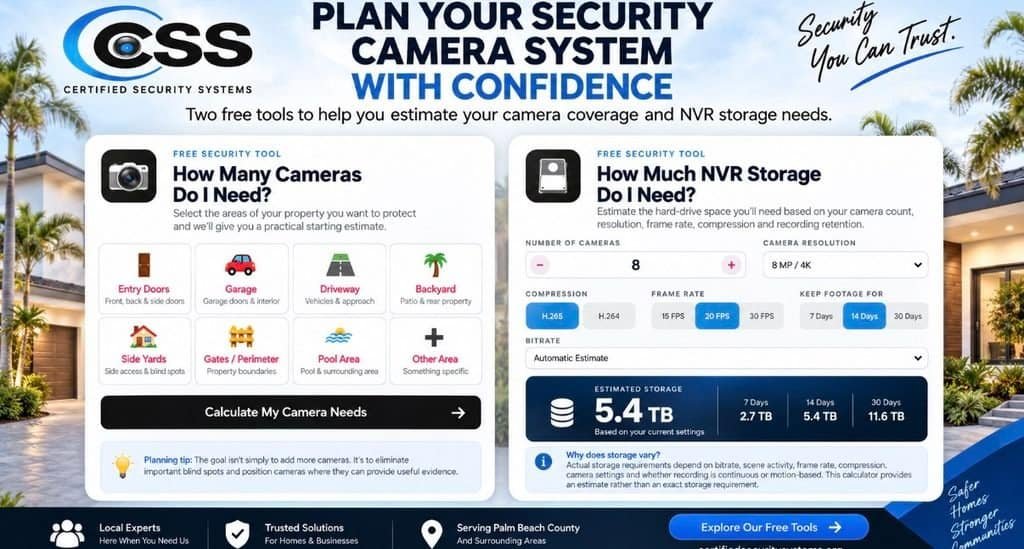
Security Camera Storage Calculator: How Much NVR Storage Do You Need?
How many security cameras do you really need? And once those cameras are recording, how much NVR storage will you need to keep your footage? Our free tools help you answer both questions before you buy.
Buying a security camera system can seem simple at first. Pick some cameras, install them around the house, connect them to an NVR and you’re done.
Until you start asking the important questions.
At Certified Security Systems, these are some of the questions homeowners ask us most often. That’s why we created two free security planning tools to help you get a better starting point before spending money on equipment.
How Many Security Cameras Do I Need?
There isn’t one magic number of cameras that works for every property. The right number depends on your property’s layout, entrances, driveways, garages, blind spots, perimeter areas and the level of detail you want to capture.
Start With What You Want to Protect
Instead of starting with a camera model, start by walking around the property and identifying the areas that matter most.
The goal isn’t simply to put a camera everywhere. The goal is to reduce important blind spots and position cameras where the footage can actually be useful.
A camera pointed in the wrong direction isn’t much help just because it’s there. Camera placement, field of view, lighting, mounting height and the distance to the subject all matter.
Find Your Starting Camera Count
Select the areas of your property you want to protect and our free calculator will give you a practical starting estimate.
Calculate My Camera Needs →Security Camera Storage Calculator: How Much NVR Storage Do You Need?
Once you’ve figured out how many cameras you need, there’s another important question:
This is one of the most overlooked parts of designing a surveillance system.
A camera doesn’t simply record a few clips and stop. If your system is configured for continuous recording, every camera can be generating video around the clock.
What Determines Security Camera Storage Requirements?
Several factors affect how much storage your NVR needs.
Number of Cameras
More cameras generally mean more video data being recorded.
Resolution
Higher-resolution cameras can require more storage, particularly when recording at higher bitrates.
Frame Rate
Higher frame rates can increase the amount of video data generated over time.
Compression
Compression technologies such as H.265 can reduce storage requirements compared with less efficient compression settings.
Retention Period
Keeping 30 days of footage requires substantially more storage than keeping 7 days.
Recording Method
Continuous recording and motion-based recording can produce very different storage requirements.
Why Storage Can Add Up Quickly
Imagine a home with eight high-resolution cameras recording continuously.
That combination can require significantly more storage than someone might expect. The exact requirement depends heavily on bitrate, frame rate, compression, scene activity and recording settings.
That’s why simply saying “I have eight cameras” isn’t enough information to determine the right hard-drive size.
Calculate Your Estimated Storage
Enter your camera count, resolution, frame rate, compression and desired retention period to see an estimated storage requirement.
Choosing the Right Security Camera System
Once you understand your coverage and storage requirements, you can start thinking about the equipment itself.
There isn’t one camera platform that is perfect for every homeowner or business. Different systems make sense for different properties, budgets, network environments and performance requirements.
Some of the manufacturers and platforms we work with or encounter include:
Reolink
Reolink offers a broad range of security cameras and recording options, including PoE, Wi-Fi and other configurations. Its product lineup includes cameras ranging from traditional fixed cameras to multi-lens, PTZ and higher-resolution options.
Visit Reolink →UniFi Protect
UniFi Protect is part of Ubiquiti’s UniFi ecosystem and uses local video storage with centralized management. UniFi also supports ONVIF-compatible third-party cameras in supported configurations.
Visit Ubiquiti →Hanwha Vision
Hanwha Vision offers professional surveillance equipment including network cameras, AI cameras, PTZ cameras and license plate recognition solutions for more demanding residential and commercial applications.
Visit Hanwha Vision →Important: These are examples of manufacturers and platforms—not a ranking. The right equipment depends on the property, application, network, budget, recording requirements and desired features.
PoE vs. Wi-Fi: How Should Your Cameras Connect?
For many permanent security camera installations, Power over Ethernet (PoE) is worth considering because one Ethernet cable can provide both network connectivity and power to a compatible camera.
Wi-Fi cameras can offer more flexibility where running Ethernet isn’t practical, but wireless performance depends on the property’s network environment and signal strength.
The right choice depends on the property. For a new construction, renovation or major security installation, it’s worth thinking about your wiring strategy before the walls are closed.
Don’t Start With the Camera. Start With the Plan.
One of the biggest mistakes homeowners can make is choosing equipment first and trying to make the rest of the system fit around it.
A better approach is:
Plan Your Security Camera System With Confidence
We created these tools because homeowners shouldn’t have to guess how many cameras they need or how much storage their system will require.
Use our free camera planning calculator, NVR storage calculator, checklists and other security education resources before you buy.
Explore the Free Security Tools →Frequently Asked Questions About Security Camera Storage
How much storage do I need for 8 security cameras?
There isn’t one universal answer. Storage depends on the cameras’ resolution, bitrate, frame rate, compression, recording schedule and desired retention period. Use our security camera storage calculator to estimate your needs.
Is 4K security camera video better?
Higher resolution can provide more image detail, but resolution is only one part of the equation. Camera placement, lens, lighting, field of view, bitrate and the distance to the subject all affect how useful recorded video will be.
Is H.265 better for security camera storage?
H.265 can provide more efficient compression than H.264, potentially reducing the amount of storage required for comparable video settings. Actual results depend on the camera, bitrate and recording configuration.
Should security cameras record 24/7?
It depends on the application. Continuous recording can provide a more complete record of events, while motion-based recording can reduce storage requirements. The appropriate configuration depends on what you are trying to protect and how you want to use the footage.
How long should security camera footage be stored?
There is no single retention period that works for everyone. Some homeowners may want a shorter retention period, while businesses or properties with specific security requirements may need longer retention. Your desired retention period is one of the biggest factors in determining storage capacity.