
The 3 O’Clock Gap: Knowing Your Teens Got Home Safe While You’re at Work
The bus pulls away. You’re still at the office. How do you know they made it inside, and stayed there? Here’s how after school home security solved it for one Royal Palm Beach family.
Written by the Certified Security Systems Team
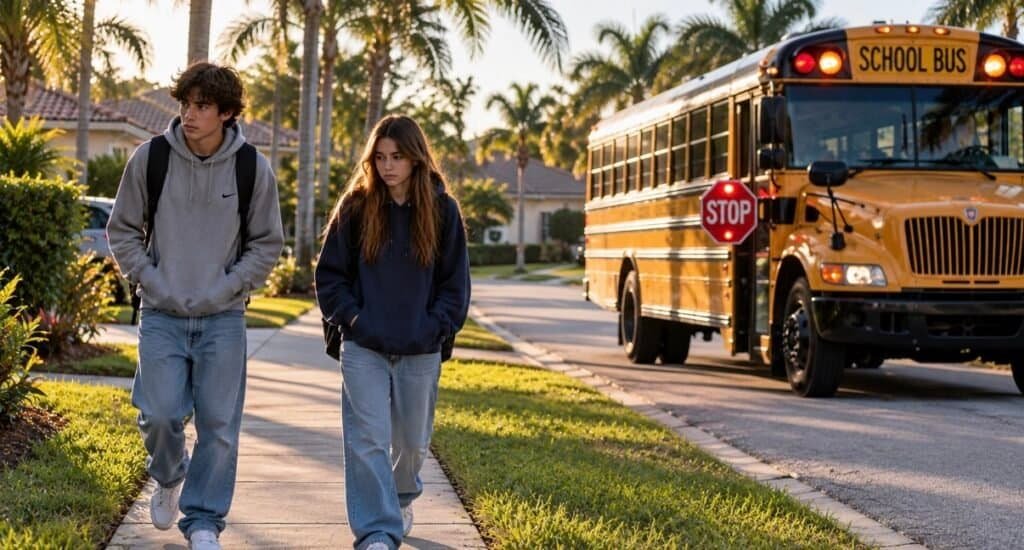
The school bell rings. The bus pulls away. And somewhere in an office across Palm Beach County, two working parents glance at the clock and wonder the same thing: did the kids make it home?
We call it the 3 o’clock gap. It’s the stretch between the last bell and the end of the workday, when teenagers are on their own and parents are stuck waiting for a text that may or may not come. Recently, a Royal Palm Beach family asked us to close that gap for good with a complete after school home security system.
The family: two careers, two teens, one bus stop
Both parents work outside the home. Their two kids, a daughter in 10th grade and a son in 12th grade, ride the school bus every day and get dropped off in the neighborhood, a short walk from the front door.
The parents’ worry was simple: they wanted to know their children made it home, and know they stayed home. They didn’t want to rely on a “got home” text that teenagers forget to send, or a house key that could get lost, copied or left in a backpack at a friend’s house.
Get in without a key
A smart keypad lock with a personal code for each teen.
See them arrive
Cameras covering the walk from the street to the front door.
Protect them inside
A monitored alarm system the teens arm the moment they’re in.
Step 1: Ditch the house key for a smart keypad lock
We installed a Kwikset smart keypad lock on the front door. It works with both the ADT Command system and Google Home, so it fits into whichever app the family uses.
Each teen gets their own personal code, and that matters:
- Parents know who came home. The app shows which code opened the door and when, right on Mom’s phone.
- No keys to lose. If a code is ever shared with the wrong friend, parents change it from their phone in seconds. No locksmith, no rekeying.
Step 2: Cameras that watch for the walk home
We placed cameras to cover the walk from the street to the front door, plus a clear view of the entry. When the kids come up the walkway, the parents get an alert and can watch them arrive live or check the clip later.
This is also where the “stayed home” part comes in. If the front door opens again later in the afternoon, the parents see it. Every coming and going is on record, with no detective work required.
Not sure where your cameras should go? Our team plans placement during every installation so there are no blind spots between the curb and the couch.
Step 3: An alarm that protects them once they’re inside
Cameras show you what’s happening. An alarm system does something about it, and it’s the backbone of any after school home security plan. Each teen has their own alarm code, so they disarm the system when they get home, and the parents are notified when they do.
Once the kids are inside, they arm the system in Stay mode. The doors and windows stay protected while the kids move freely around the house. If anyone tries to come in, the alarm sounds and professional monitoring responds, even if the teens have headphones on and never hear the doorbell.
After school home security, all in one app
Here’s the part parents love. The lock, the cameras and the alarm don’t live in three different apps. CSS systems work together in one app, and each family chooses either the ADT+ app or the Google Home app.
On a typical school day, the parents’ phones tell the whole story in a few quick alerts. No texts, no guessing, and they can get back to work.
See the locks, cameras and alarm panels we install on our products page.
Is my teen old enough to stay home alone in Florida?
It’s one of the most common questions parents ask, and the answer surprises people: Florida has no minimum legal age for leaving a child home alone. The Florida Department of Children and Families recommends waiting until a child is 12, and the decision is ultimately up to parents (ClickOrlando).
Law enforcement suggests building up slowly and even using a camera system to check in during the day (WPTV). A connected security system won’t replace good judgment, but it gives parents real information instead of guesswork.
Your after school home security checklist
- Give each child their own lock code and alarm code
- Turn on arrival notifications for the front door lock
- Cover the walkway and the entry with cameras
- Teach your kids to arm the alarm in Stay mode as soon as they’re inside
- Practice what to do if the alarm goes off or a stranger knocks
- Make sure everyone knows how to call 911
Frequently asked questions
What is the best after school home security setup?
A keypad smart lock with a personal code for each child, cameras covering the walkway and front door, and a monitored alarm system, all connected in one app. Together they tell you when your kids got home and keep them protected once they’re inside.
How do I know when my kids get home from school?
A smart lock with individual codes sends a notification showing which child unlocked the door and when. Pair it with a camera on the front walkway and an alarm that notifies you when it’s disarmed, and you’ll know the moment they’re home.
Should my teenager have a house key or a door code?
A code is safer and easier. Keys get lost or copied, and you never know who used one. A code can be changed from your phone in seconds, and each use is logged under your child’s name.
What age can a child stay home alone in Florida?
Florida has no minimum legal age. The Florida Department of Children and Families recommends waiting until a child is 12, and parents are expected to judge whether their child is ready.
Can my security cameras, alarm and smart lock work in one app?
Yes. Certified Security Systems sets up locks, cameras and alarm systems to work together in one app, either the ADT+ app or the Google Home app.
What if my teen forgets to arm the alarm?
You can arm it from your phone. If you see the kids are home and the system is still disarmed, one tap puts it in Stay mode.
Get after school home security for your family
Smart locks, cameras and alarm systems that work together in one app, installed by a local Royal Palm Beach team. Have a written quote from someone else? We’ll beat it. Every time.
561-285-2780 Request a Free QuoteHave more questions? Check our FAQs. And if you live out west, don’t miss our guide to keeping your cameras clear during black snow season.
Certified Security Systems
1127 Royal Palm Beach Blvd #336, Royal Palm Beach, FL 33411
561-285-2780 | info@certifiedsecuritysystems.org